
Research Radar · AI Foundations, Part 1
By Dong Danping, Senior Librarian, Research & Data Services
If you've used ChatGPT or Claude for a while, you may have noticed it starts to "know" you. It remembers what you work on, how you like answers formatted, even what's been happening in your projects lately.
Yet within a single chat, it can lose the thread. Say you've spent an afternoon working through a research question with it: sharing articles, testing ideas, pushing back on its suggestions. Somewhere along the way, you realise it has forgotten points you settled an hour earlier.
So it seems to remember you across weeks, yet loses track within a single afternoon. Both come down to one concept: context. Once you understand it, most of what AI "remembers" and "forgets" starts to make sense.
Every reply is a fresh reading
A chat you've been working in for a while looks like one continuous conversation. Underneath, it isn't.
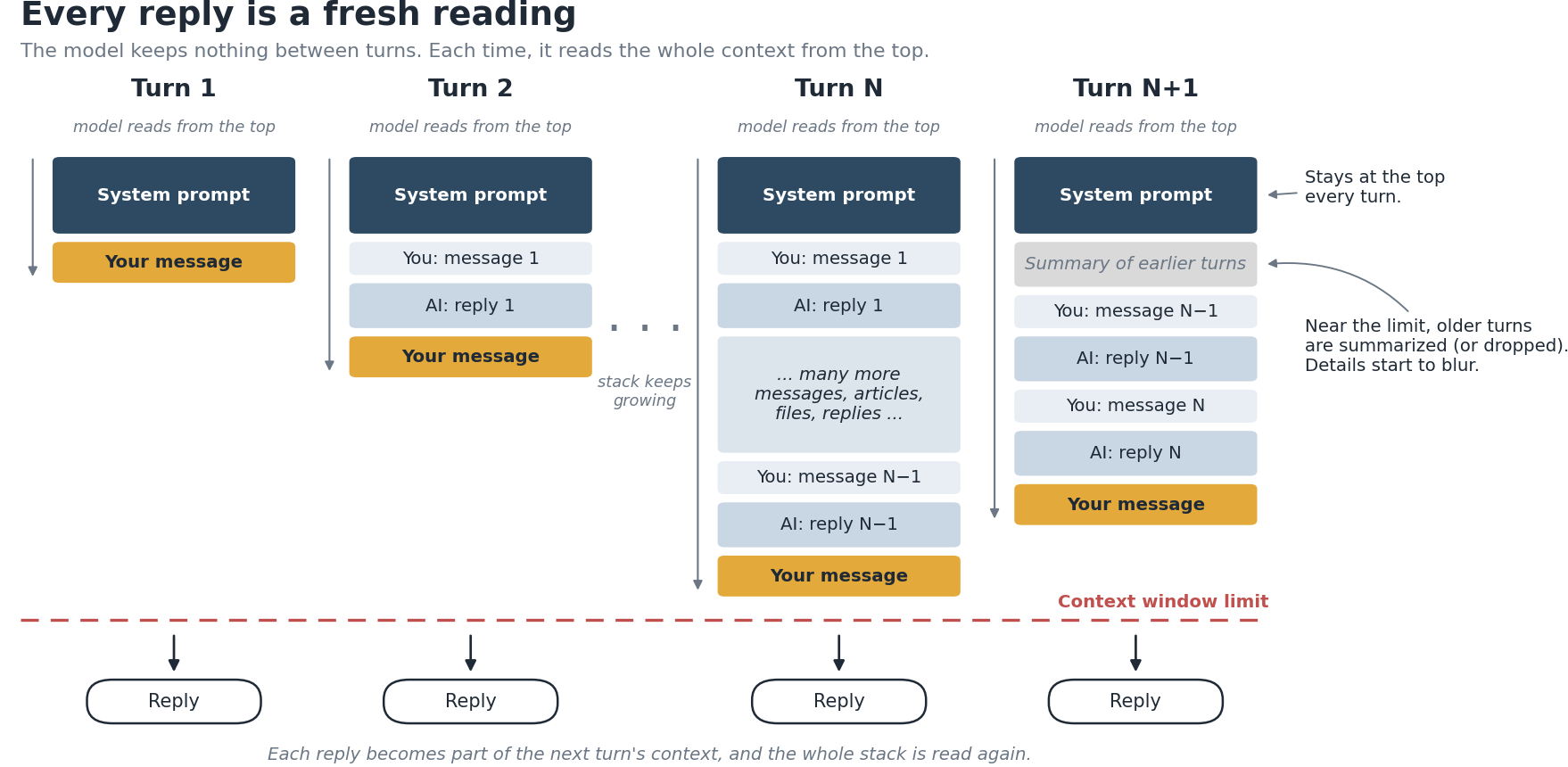
The large language model (LLM) keeps nothing between one message and the next. Each time you press send, the app gathers a bundle of material and passes it to the model to read from the top. The model writes its reply from that bundle and nothing else, then forgets it all. The model itself doesn't learn or change from your conversation. Anything that looks like learning happens outside the model, in what gets put into the bundle.
I find it helpful to think of each reply as a reading comprehension exercise. The model gets a passage, reads all of it, and replies at the bottom. Your next message brings a new passage, which includes the old one plus your new question, and the model reads it from the start again. The chat feels continuous, but each turn is an independent call.
That passage is the context. Anthropic's documentation describes it as the model's "working memory". The exact contents vary by platform, but it usually includes:
- The system prompt, at the top. This holds the provider's standing instructions, your custom or project instructions, descriptions of the tools the AI can use (such as web search), and often memories that are loaded every time.
- The conversation so far: your messages and AI’s replies.
- Your new message.
- Retrieved material: anything the AI looks up during this turn, such as files, web results, or relevant notes from past chats.
The context window
The passage has a size limit, called the context window, measured in tokens (roughly, pieces of words). When a long chat gets close to the limit, something has to give. Depending on the tool, older parts of the conversation are either dropped or replaced with a summary. Claude, for example, summarizes earlier messages automatically so the chat can continue. Either way, details from early in the chat are the first to blur. The system prompt is normally kept, which is why your custom instructions keep working while a table you pasted an hour ago fades.
There's a second, subtler problem: quality slips well before the limit. Anthropic calls this context rot: as the context grows, accuracy and recall degrade. Research also shows models use information at the beginning and end of a long input best, and are weaker with what's in the middle. Think of someone handed a 300-page briefing pack minutes before a meeting. They'll read the first and last pages carefully and skim the rest. Adding more to the context doesn't guarantee the model will use it well. The details that matter have to compete for attention with irrelevant information in the same context.
So what is "memory", really?
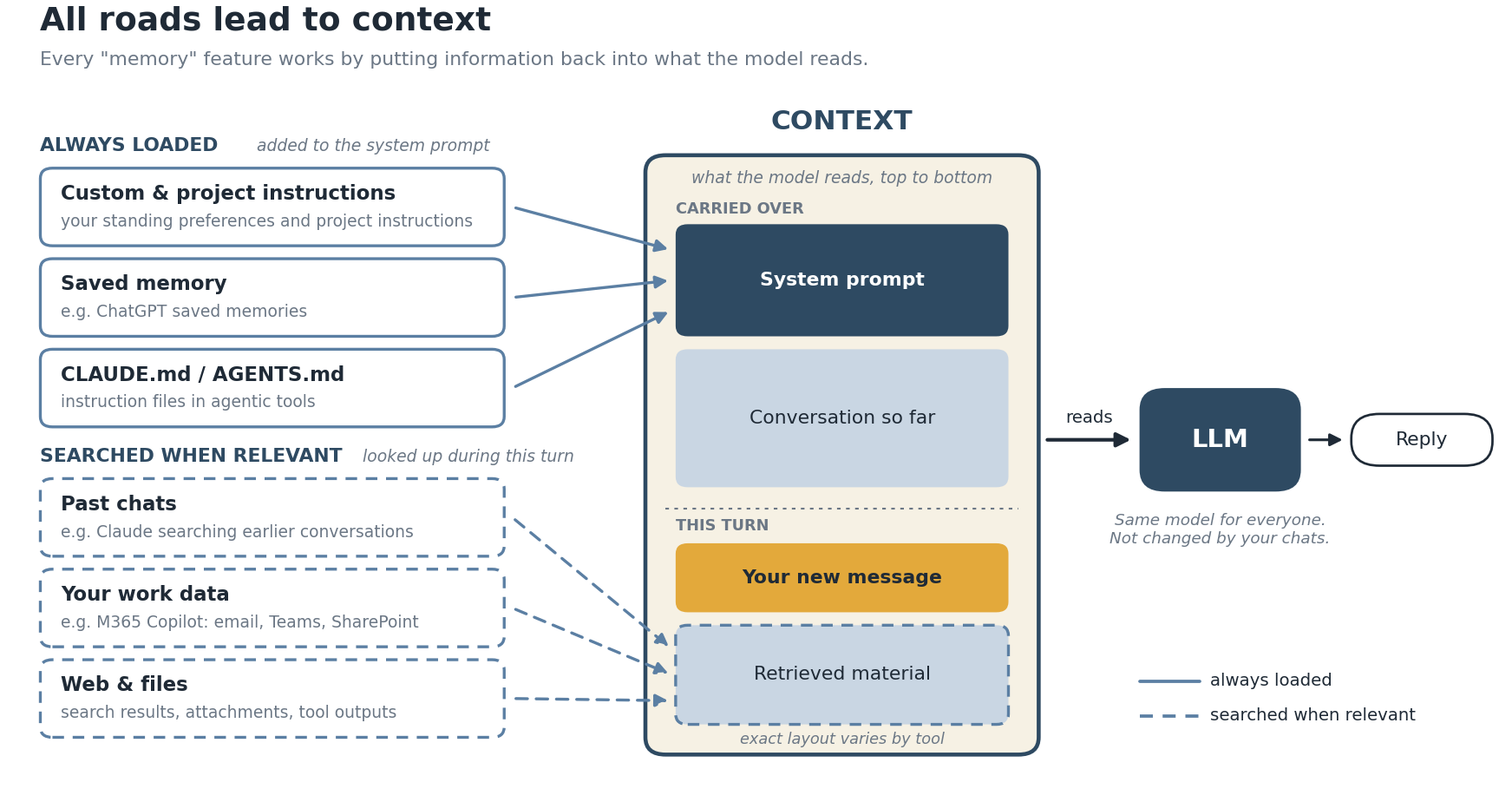
If the model only ever knows what's in the context, then every memory feature has to do the same job: work out what's relevant and put it back into the context.
OpenAI says this directly: saved memories, like custom instructions, are part of the context ChatGPT uses to generate a response. Project instructions work the same way, added to every chat in that project.
Behind the scenes, these features save information outside the model and bring it back in two main ways. Some are always loaded: ChatGPT's saved memories, for instance, are considered in every response, while its chat history feature doesn't keep every detail and OpenAI hasn't published exactly how it selects what to bring back. Others are searched when relevant: Claude can search your past chats using retrieval, and you'll see it happen as a tool call in your conversation. Either way, the destination is the same: the context. That's why a new chat can mention something you never said in that session.
Microsoft 365 Copilot takes retrieval furthest. With a Microsoft 365 Copilot license, it can search your emails, Teams chats, meetings and files in SharePoint and OneDrive, then add the relevant pieces to your prompt before the model sees it. Microsoft calls this grounding, and it only uses content you already have permission to access. (Without the license, Copilot Chat grounds its answers on the web only.) So when Copilot seems to "know" your project, it hasn't remembered anything. It looked things up and put them into what the model reads.
These features look different, but they all work the same way. It's all about context.
Every AI "memory" feature is just a way of putting the right things back into what the model reads. Once you see that, you can start doing it on purpose.
Who controls the context?
| Who puts it in | Examples | Your control |
|---|---|---|
| The platform, automatically | Saved memory and chat history in ChatGPT and Claude; Microsoft 365 Copilot grounding on your emails, chats, meetings and files | Low. You can usually turn it on or off and view or delete what's saved |
| You, for every chat | Custom instructions / personal preferences | Medium. Added to the system prompt of every chat |
| You, per project | Projects in ChatGPT or Claude, with their own instructions and files | Medium to high. Scoped at project level. |
| You, directly as a file | CLAUDE.md or AGENTS.md in agentic tools like Claude Code and Codex | High. You write the instructions yourself. |
The further down the table you go, the more you decide what the model reads. The automatic options are convenient, but you can't always see what was selected. The options further down take more effort, and in return you know exactly what's going in.
The last row shows the mechanism most clearly. In Claude Code, each session starts with a fresh context window, and instruction files like CLAUDE.md are loaded at the start of every session. Because you write and edit these files yourself, you have far more control over what the model carries into each session: background on your project, your preferences, and any instructions you want it to keep following.
What this means for your research
Start a fresh chat for a new task. A long chat isn't a smarter chat. Because of context rot, older material crowds the context and quality drifts. If you need continuity, ask the AI to summarize the key decisions and open questions, then start a new chat with that summary. This is essentially what automatic summarization in Claude, or compaction in Claude Code and Codex, does, except here you choose what to keep.
Expect variation, and know what shapes it. The same question can get different answers because the context is different: memory, custom instructions, earlier turns in the chat, and any retrieved material all feed into the response. Even with identical context, outputs can vary, because models generate text probabilistically. This is less of a concern for simple factual questions, but it matters when you're relying on AI for analysis, coding or interpretation. When consistency matters, reduce the variables. Use a temporary chat, which in ChatGPT doesn't read or create memories, and keep a record of the prompts and materials you used.
Put standing instructions in the system prompt. If you keep repeating "use British spelling" or "only cite peer-reviewed sources", move it into your custom instructions or project instructions. Instructions given mid-chat can get summarized away or lost in a long conversation. Instructions in the system prompt are carried into every turn.
Keep your own project memory. A short running document with your research question, key decisions and sources is more reliable than hoping the AI remembers. In a regular chatbot, you can paste it in or add it to project files. In agentic tools like Claude Code or Codex, this can live in the project folder as a CLAUDE.md or AGENTS.md, or as a notes file the AI reads and updates as you work.
Go easy on long documents. Uploading ten PDFs fills the context quickly, and details buried in the middle are the most likely to be missed. For close reading, work with fewer documents at a time and verify citations against the source.
Try it yourself: see context in action
Want to see what "context" looks like in practice? Press Send in this short interactive to see what an AI app actually sends along with your message.
What's next
Everyone seems to be talking about "agents" these days, but what actually makes something an agent? A system prompt? Access to tools? As it turns out, the answer also comes back to context. That's where I'd like to pick up next time.
Sources
- Anthropic. Context windows. Claude Platform Docs.
- Anthropic. How do usage and length limits work? Claude Help Center.
- Anthropic. Use Claude's chat search and memory to build on previous context. Claude Help Center.
- Anthropic. How Claude remembers your project. Claude Code Docs.
- OpenAI. Memory FAQ. OpenAI Help Center.
- Microsoft. What information does Copilot use to answer my prompt? Microsoft Support.
- Microsoft. How grounding works with a work or school account. Microsoft Support.
- Microsoft. Microsoft Copilot architecture and how it works. Microsoft Learn.
- Liu, N. F., et al. (2024). Lost in the Middle: How Language Models Use Long Contexts. Transactions of the ACL, 12, 157–173.
Further reading: HKUST Library, What Your AI Remembers About You, an excellent companion piece on context windows and account memory.