

By Aaron Tay, Head, Data Services
Imagine asking Claude: "Search for recent papers on transformer architectures in medical imaging using Consensus.ai, take the top three results, and for each one, check how many studies have cited it supportively versus critically using scite.ai"
That is not hypothetical. With MCP servers connected, Claude (or ChatGPT) can do exactly this — chaining searches across multiple academic sources in a single conversation, then synthesising, filtering, or comparing the results however you ask.
This piece explains what MCP servers are, why they matter for your research workflow, and how to set up two that are available now through SMU subscriptions: Scite.ai and Consensus.
Warning: MCP server support is experimental. Features may change or be withdrawn as business models evolve. Also see the security note below before connecting.
Why bother? You can already search Scite and Consensus directly.
True. And there are good reasons to keep using those native tools. Their interfaces are familiar, fast, and designed for academic work. They also offer features that general-purpose LLM interfaces do not, such as citation classification in Scite, the Consensus meter feature in Consensus, and specialised academic search tools such as Undermind that are built to search only scholarly content.
But those searches still tend to happen in silos. You search one tool, inspect the results, then manually move between interfaces to compare, cross-check, or combine what you find.
When Claude or ChatGPT has access to these tools via MCP, it can do that cross-source work for you. It can call Scite, Consensus, and other tools autonomously, multiple times and in sequence, then synthesise the results into a single workflow.
LLMs' own built-in web browse tool is also helpful. This sometimes matters because sometimes you do not want only material from academic databases. You may want scholarly articles alongside non-preprint grey literature such as reports, policy papers, technical documentation, or web content. Specialised academic tools are excellent for searching the scholarly literature (including preprints), but they are not always strong at covering this broader landscape. General-purpose LLMs such as ChatGPT and Claude are still unusually useful here because they can combine academic results with other forms of discoverable online content in one place.
When Claude has access to these tools via MCP, it can reason about what to do and call them autonomously — multiple times, in sequence, combining results across sources. For example:
- Search Consensus for a topic, take the top three results, then feed those to Scite to retrieve their contrasting and supporting citation counts
- Search multiple sources, deduplicate, and filter against your existing library (if you have connected it to sources like Zotero or Obsidian)
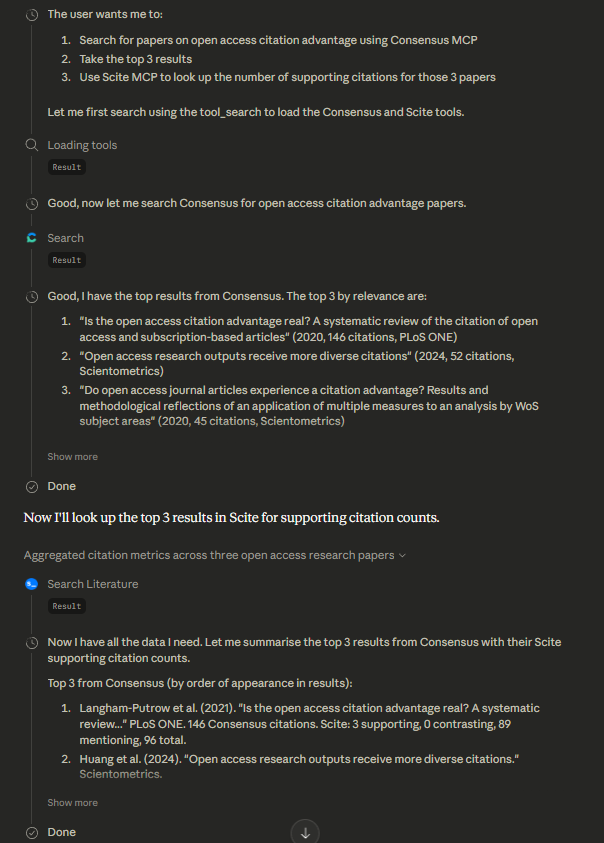
The screenshot above shows Claude reasoning through the steps needed and calling both Consensus and Scite to accomplish a multi-step task. This is what the AI field calls agentic workflows — the LLM decides which tools to call and in what order.
The more tools you connect, the more sophisticated these workflows become. On my own local setup with Claude Code, I have Claude connected to a local Zotero MCP server alongside academic search sources. I can ask it to search for papers, deduplicate across sources, check them against my Zotero library, and display only the ones I have not already saved.
What is MCP, in 30 seconds?
MCP (Model Context Protocol) is an open standard created by Anthropic in late 2024 and now supported by OpenAI and Google. Think of it as a universal connector — like USB-C, but for AI models.
Without MCP, connecting PubMed to ChatGPT requires custom code. Connecting PubMed to Claude requires different custom code. MCP eliminates this: a data provider builds one MCP-compatible server, and any MCP-compliant AI can plug in.
This is why publishers and academic search providers are starting to offer MCP servers. Early movers include Scholar Gateway (Wiley), Perplexity, Statista, Scite.ai, and Consensus, with more coming.
In this piece, we will describe how to install Scite and Consensus MCP and use it for free via SMU Libraries subscription.
To learn more about MCP, watch this 2-minute explainer video or read the full specification.
A note on security
Adding an MCP server gives the AI model more ways to access data and take actions, which increases the risk of prompt injection. Remote MCP servers listed in official directories (like Claude's connectors or ChatGPT's app store) are lower risk than custom local setups, but not risk-free. Custom local MCP servers — where you run code on your own machine — carry the highest risk, as they may access local files, credentials, or system resources.
The setups described below show how to connect to two official remote servers (Scite, Consensus) only.
Setting up Scite.ai MCP server
Scite.ai started as a citation classification tool (categorising citations as mentioning, contrasting, or supporting) and later added AI-powered literature search via Scite Assistant. They recently launched an MCP server. To learn more, watch their recent webinar or check their setup guide.
In ChatGPT (free version works):
- Go to Apps and search for "scite"
- Click Connect
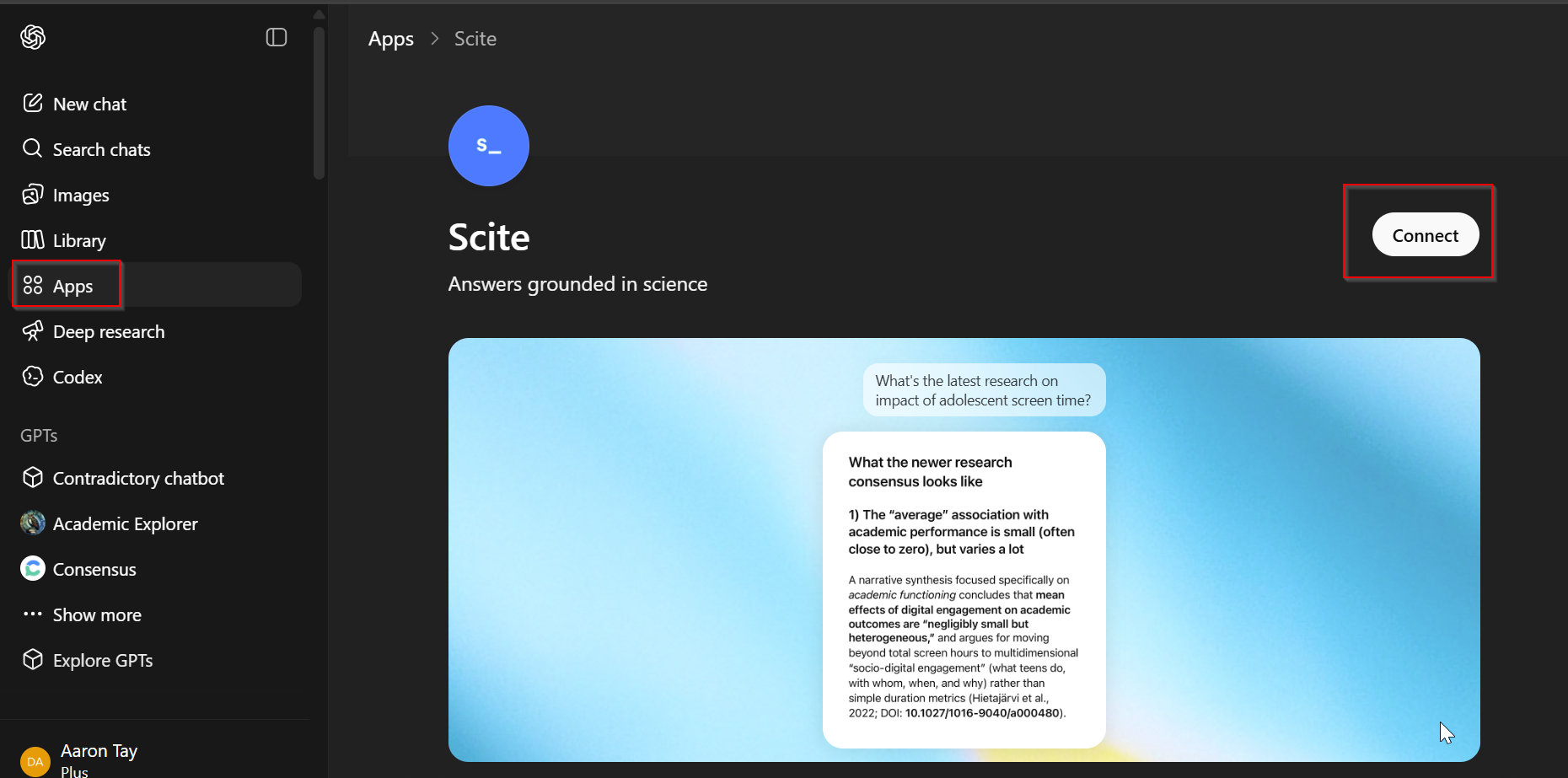
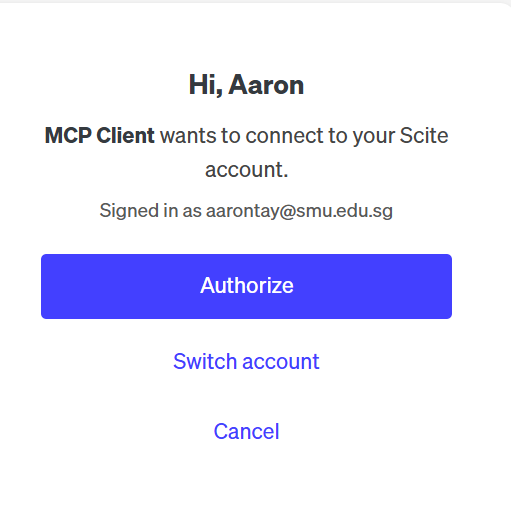
- You will be redirected to scite.ai — sign in and click Authorise
In Claude.ai (free version should work):
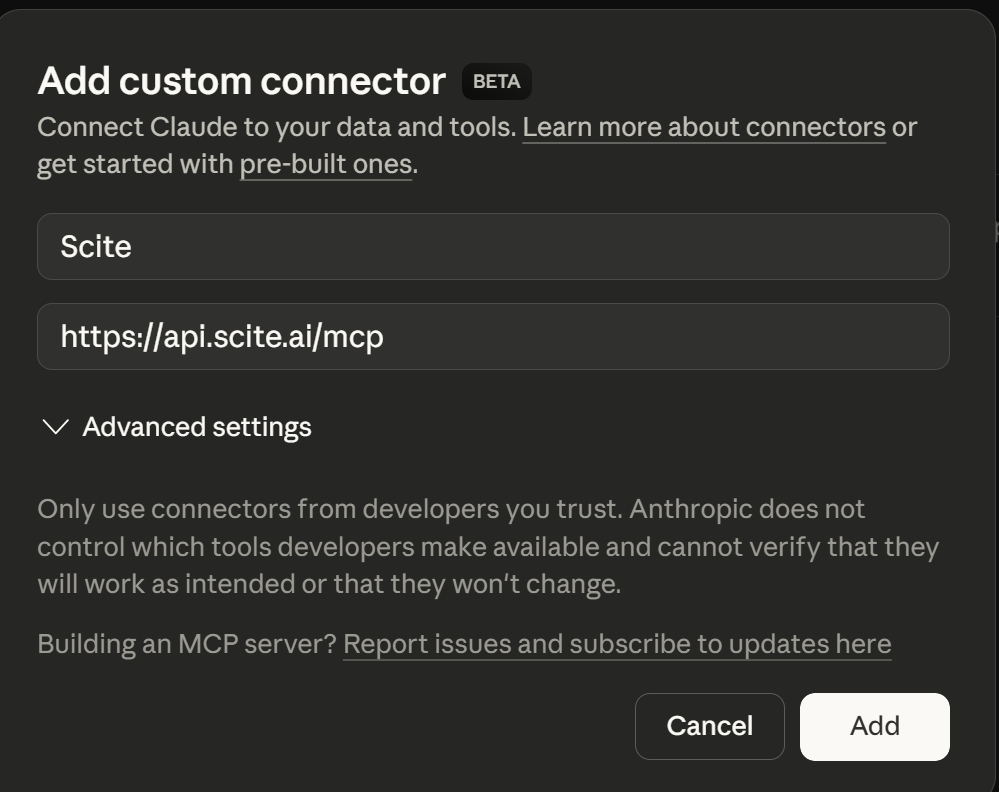
At the time of writing, Scite is not yet listed in Claude's connectors directory, but you can add it as a custom MCP server following the instructions.
[29 April 2026] - New update, you can skip the steps below and just browse Claude Connectors and add Scite MCP directly.
Setting up Consensus MCP Server
Consensus is another powerful AI-powered academic search tool available through SMU (currently on a one-year trial up to Aug).
Note: Consensus MCP Server usage has a limit of 1000 searches per month (20 papers per search). Normal usage is unlikely to hit this limit, but heavy use for say systematic reviews might.
In Claude.ai (free version should work):
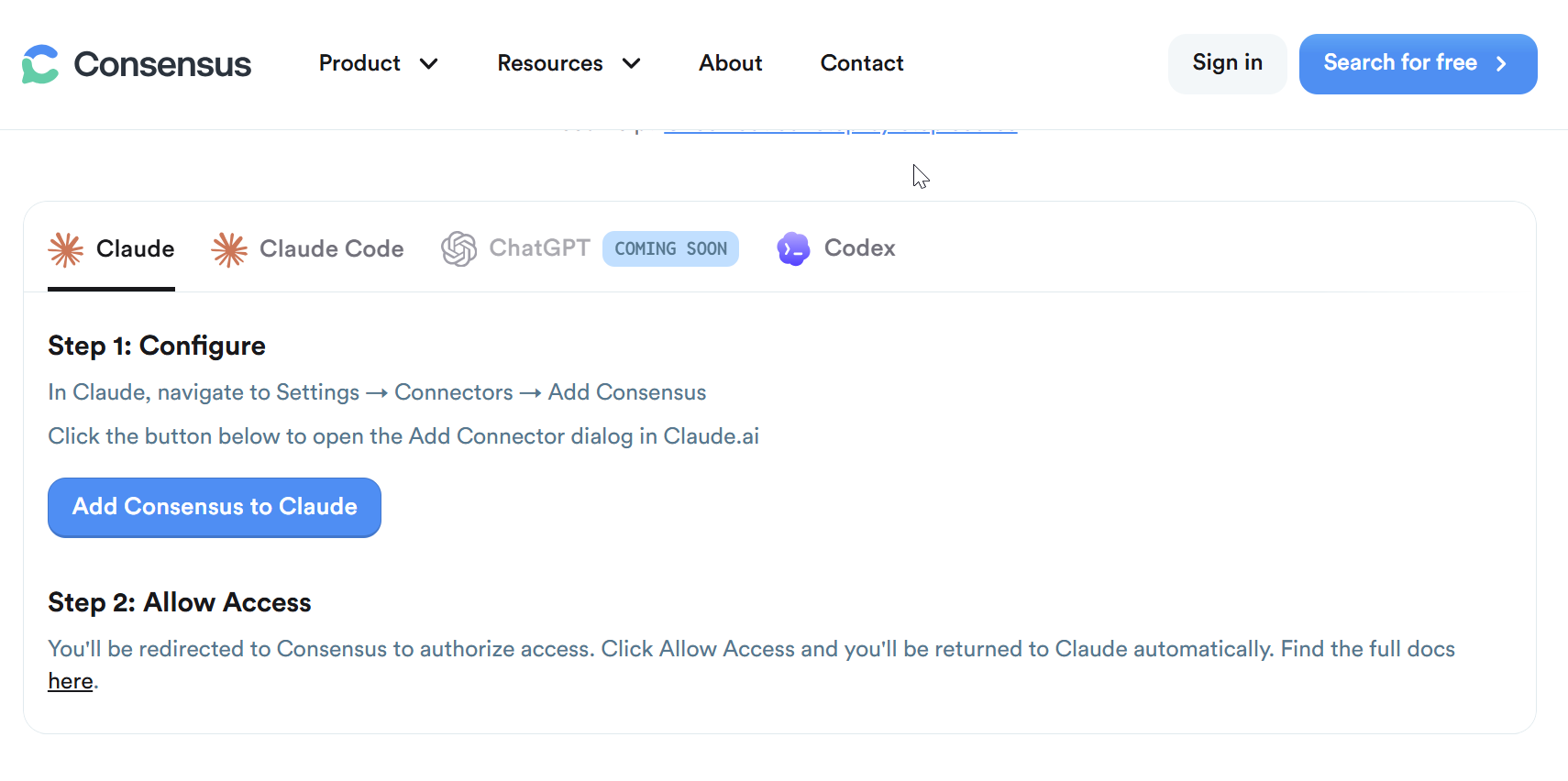
Consensus is listed in Claude's connectors directory. Go to Connectors, browse, and search for Consensus — or go directly via the link on the Consensus MCP server page. Authorise access when prompted.
In ChatGPT:
NEW!: As of 6th April 2026, Consensus is also listed in the OpenAI ChatGPT app store. Follow the same instructions to search for and add Consensus.
Do you need both?
Both Scite and Consensus search broadly similar open academic indexes, though each claims additional proprietary partnerships (see Scite's partnership list and Consensus's partnership list). Their ranking algorithms differ, so results will vary — trying both is worthwhile.
They also offer different functionality. For instance, Scite's MCP server can search specifically for papers with high numbers of contrasting citations, which Consensus cannot.
One caveat: connecting too many MCP servers that go unused can flood the LLM's context window, potentially degrading response quality. Connect what you will actually use.
How they work in practice
Once connected, LLMs generally recognise when to use academic search tools based on the nature of your query. Ask a research question, and Claude or ChatGPT will typically call the MCP server automatically.
You can also explicitly direct the LLM to use a specific server, either in natural language ("use Scite to search for...") or through the interface controls.

Below is part of the response. You can see ChatGPT deciding to call the Scite MCP server and the request/response in JSON.
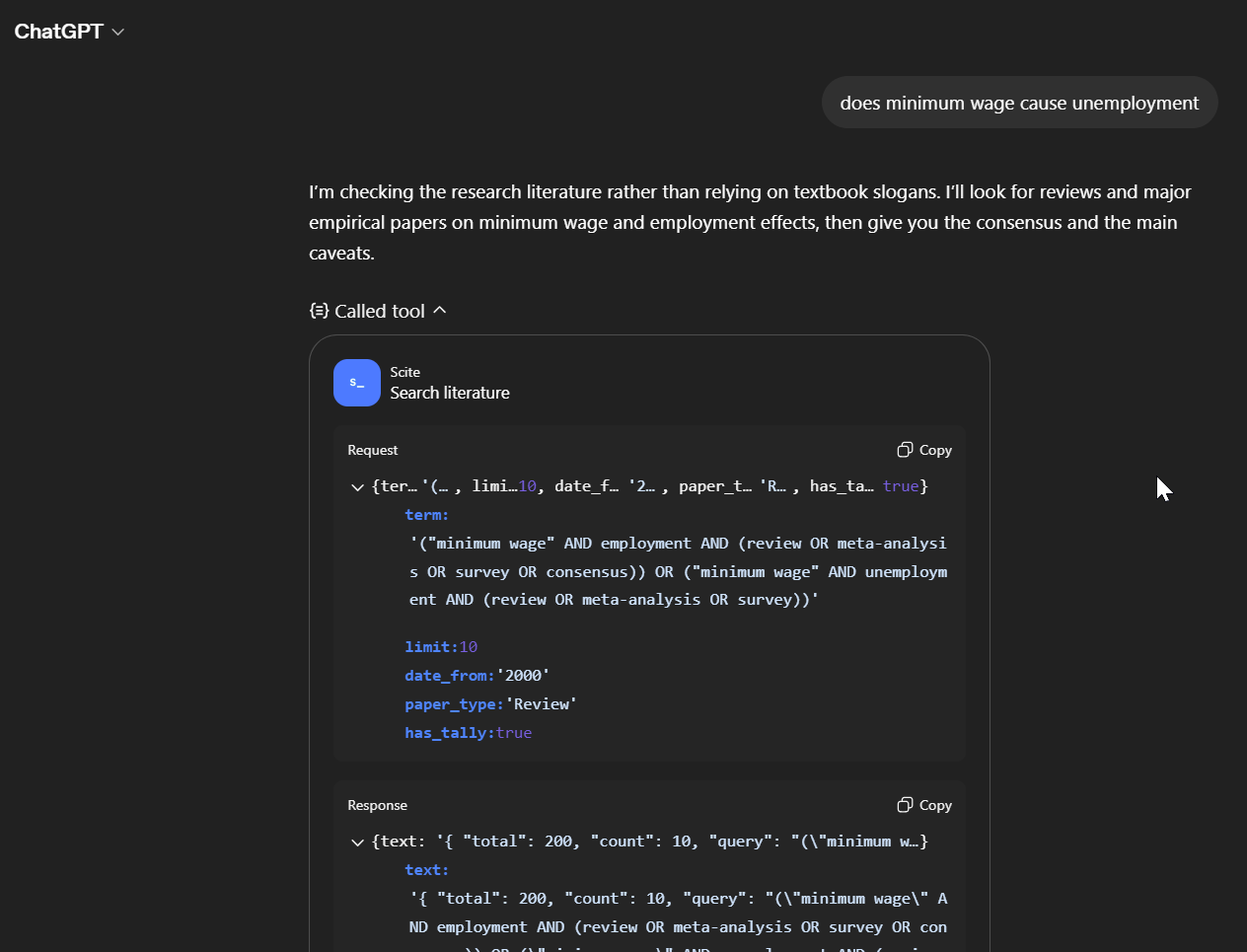
In this example, ChatGPT calls the Scite MCP server multiple times before assembling a cited answer. Using MCP servers this way ensures that cited papers are almost always real — though the LLM can still occasionally misrepresent what a paper actually says. This is exactly the same as using scite.ai directly of course.
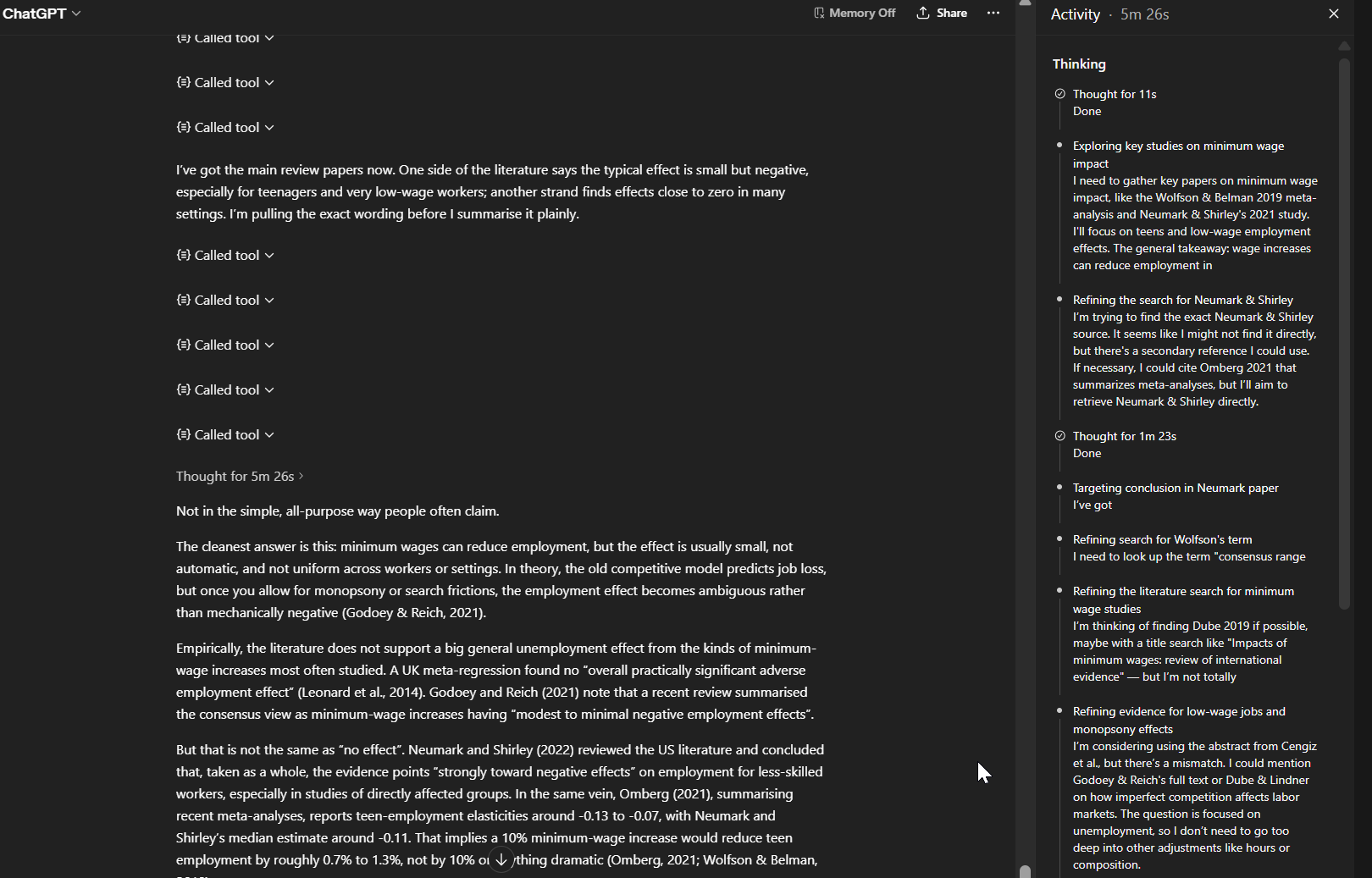
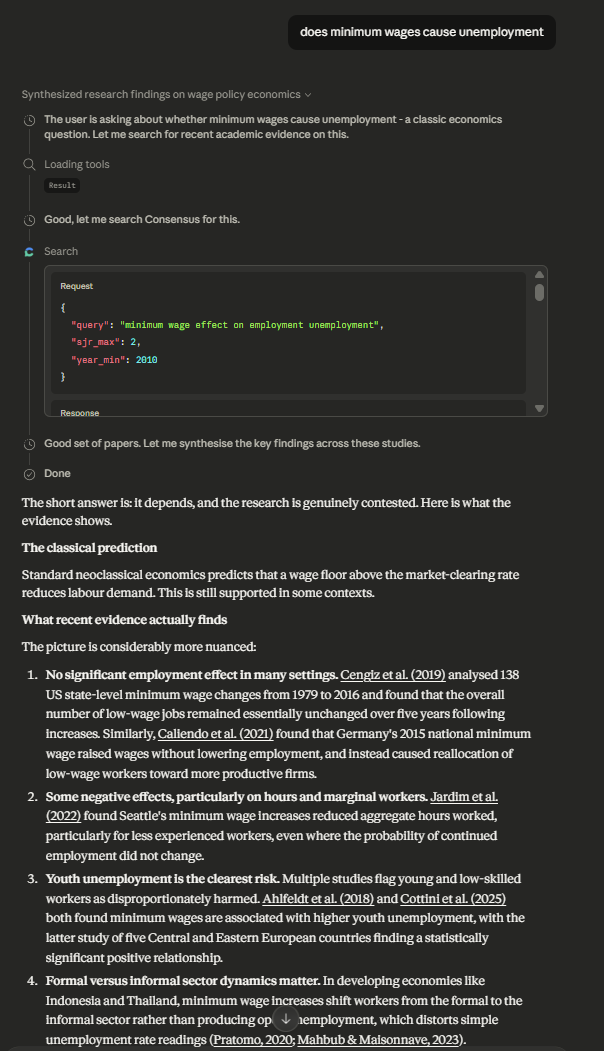
Here is the equivalent using Consensus in Claude.ai:
Other academic MCP servers
Beyond Scite and Consensus, options are currently limited. Some, like Wiley's AI Gateway, are not free. At the time of writing, perhaps the only other free academic MCP server that you might be interested in listed in Claude's connectors is PubMed.
We are currently assessing which academic MCP servers to pay for and/or deploy (e.g. a Primo MCP server that connects to our library catalogue so your LLM of choice can check if we subscribe to a certain textbook or journal seems to be useful) — do let us know if you have thoughts on the subject.
For advanced users, it is possible to run local MCP servers for custom connections. Last month's Research Radar covered connecting Claude Code to Obsidian, and I have done the same with Zotero.
Similarly, I have connected to other free open sources like OpenAlex and Semantic Scholar by running local MCP servers using code downloaded from GitHub.
However, local MCP setups carry significantly higher security risk and require technical confidence — you run unverified code locally on your machine and connect it via Claude Code (not via the web-based ChatGPT or Claude.ai interfaces).
Some researchers have gone further creating their own MCP servers (asking Claude to code it!) by using APIs or scraping web sites, creating very rich agentic flows. We may cover this in future pieces.
Going further: Claude Skills
While Claude is capable of reasoning out which tools to use, you can also define explicit workflows using Claude Skills — markdown instruction files that act as reusable prompts. For example, you could define a "literature review" skill that specifies which sources to search for particular subject areas, what output format to use, and how to handle edge cases.
Consensus has published a tutorial covering three example skills using Consensus MCP:
- Recommended Reading List — upload a course outline and Claude runs parallel Consensus searches to find recent papers for updating your reading list
- Literature Review Helper — a structured workflow for scoping out a research area with a specified report format
- Grant Searcher (NIH) — turns a research idea into a grant-ready plan by assessing fit with the literature and matching to relevant NIH funding (requires paid Claude account with Claude Code desktop)
The bottom line
Connecting LLMs to academic search tools via MCP is still early and experimental, but the direction is clear: AI models that can autonomously search, cross-reference, and synthesise across multiple academic sources on your behalf. If you want to try it now, Scite and Consensus MCP servers are available through your SMU subscriptions and take minutes to set up.