


By Aaron Tay, Head, Data Services
Not long ago, research started with a simple choice: library databases or Google Scholar. Today, you are faced with a dizzying array of AI-powered search tools, each promising to transform the way you find and use information.
But they are not created equal. Some are strongest at finding journal articles and preprints. Some help you compare studies or understand how papers have been cited. Others search the wider web for reports, policies, news and other grey literature. Using the wrong tool can leave you with an incomplete picture.
How should you combine conventional library databases and AI search tools? Though specialised AI-powered search engines like Consensus and Undermind usually have better relevance algorithms, they may lack access to the full text of paywalled journals. If not missing papers is critical to you, I recommend continuing to use your current databases (e.g. Scopus, PsycINFO and JSTOR) alongside newer AI-powered search engines until you can assess whether you can conduct your literature review without conventional databases.
So how do you decide between Consensus, Undermind, Scopus AI, Google Scholar Labs, Primo Research Assistant and the new generation of deep-research agents?
Based on your research task, here is a simple guide to help you pick the right AI search tools for the job.
When You Need a Quick Academic Answer or Want to Compare Studies: Consensus Pro
Your task is to get a quick overview of what academic research says about a question. You want a direct answer, supporting papers and perhaps a table that helps you compare the studies side by side.
Unlike Undermind, which offers only a deep-search mode that can take around 10 minutes to run, Consensus offers a quick mode.
For most SMU students, it is the strongest general-purpose starting point among the academic AI search tools covered here. You can use it to identify papers, generate preliminary synthesis and organize findings into structured comparisons.
Consensus also offers a deeper search mode for more complex questions. This can be useful when the first set of results is too shallow, although a longer AI-generated report should still be treated as a starting point rather than a finished literature review. My informal testing shows that Consensus Deep Search is quite capable compared with most tools in its class, but there are queries where Undermind still clearly outperforms it in retrieval.
Another strength of Consensus is its relatively large number of publisher partnerships, which allow it to index and access full text. By contrast, Undermind uses open sources such as Semantic Scholar and is limited to open-access full text plus titles and abstracts for paywalled papers.
These extra publisher partnerships include Sage Publishing, Wiley, De Gruyter Brill, Taylor & Francis, American Psychological Association (APA), American Chemical Society (ACS) and more. Scite also has similar publisher partnerships.
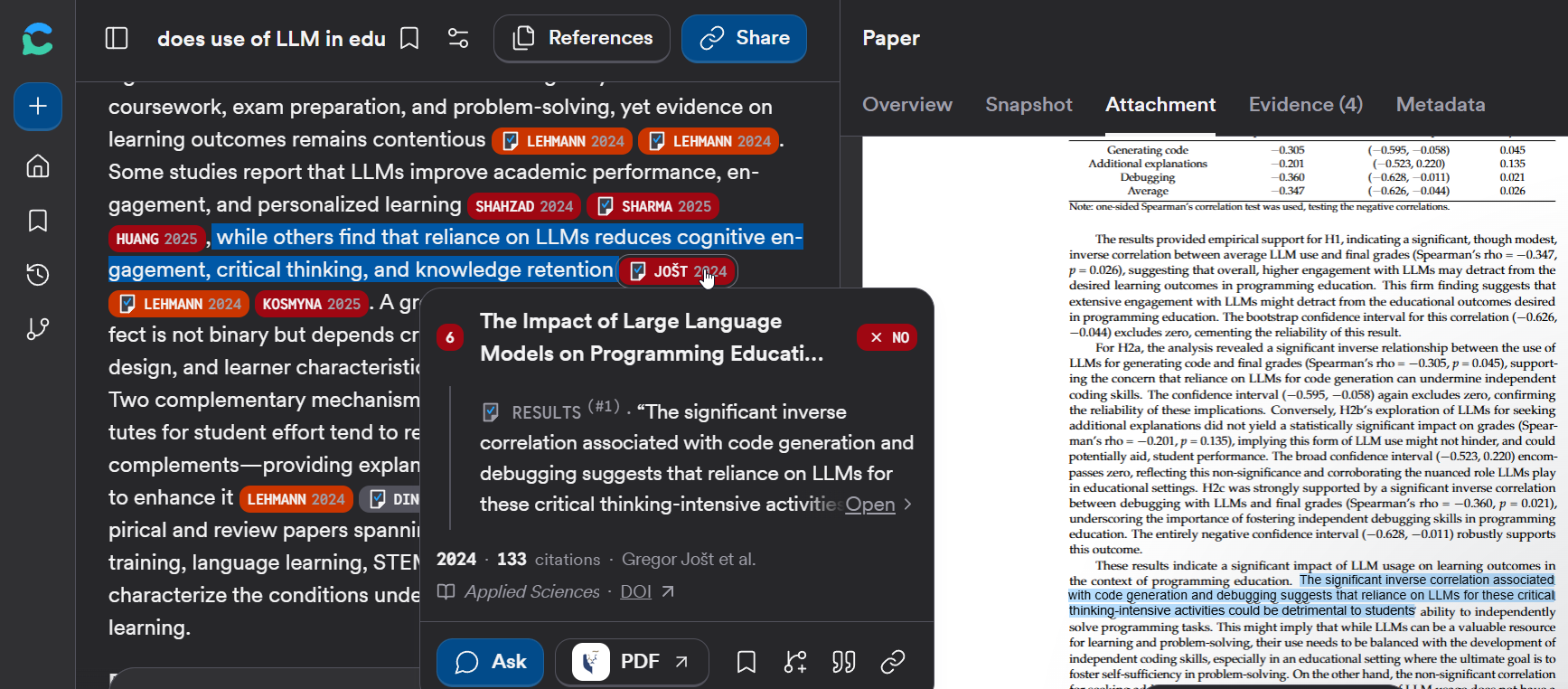
Consensus also has one of the most feature-rich interfaces, including colour-coded citations, a comprehensive set of filters and the ability to check generated citation statements (also available in Scite Assistant).
While tools like Consensus and Undermind generally have deterministic guardrails to ensure that every paper cited actually exists, such methods cannot ensure that the way the AI describes the paper is correct.
With Consensus, you can hover over each citation to see a pop-up showing the text Consensus uses to ground the generated text. In addition, if you click "Open", Consensus opens the full text of the paper and highlights the passage that was used, allowing you to see it in the context of the full paper.
First time user? Register at Consensus with your smu email.
A note of caution about the Consensus Meter
The Consensus Meter may look like a simple measure of whether researchers agree. Do not mistake the displayed percentage for a definitive measure of scientific consensus. The result depends on how the question is phrased, which papers are retrieved and how their findings are classified.
Open the cited papers and check the study design, population, context and limitations for yourself. Learn more
When You Need a Deep Search for a Difficult Question: Undermind (For Postgraduate, Faculty, Staff)
You have a narrow, complex or difficult research question. The terminology may vary across disciplines, obvious keyword searches may return too much noise, and you are willing to trade speed for stronger retrieval.
This remains a good use case for Undermind. It conducts a deeper, iterative search rather than relying on a single pass over the literature. In my experience, Undermind can still perform very well on difficult questions where the main challenge is finding the right papers.
Classic or Projects?
Undermind Classic follows a guided workflow: clarify the question, conduct a deep search and produce a one-shot report.
The default Undermind Projects provides a persistent workspace with different agents for searching and writing — this can make a big difference.
For example, in Undermind Classic you can build a report from only one query. With Undermind Projects, you can run multiple deep queries covering different aspects of a broader topic, and the system will combine them into one library. You can even ask Undermind agents to organise the papers into folders.
The screenshot below shows a workspace where I have run five different queries covering different aspects of a broad topic. You can also see an "All Papers" library. Undermind has also organised the papers into folders. The workspace also includes multiple reports that I have iterated on.
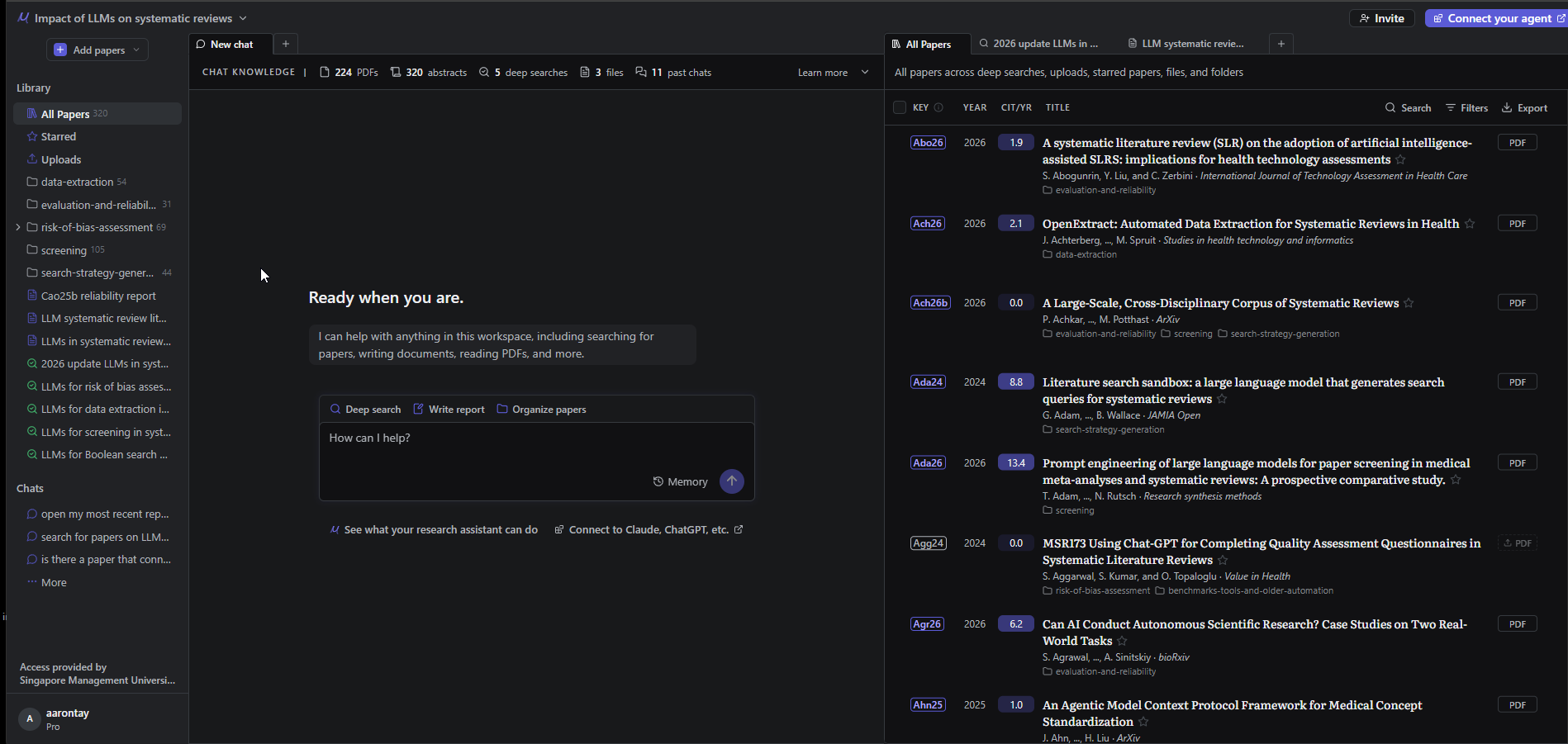
Projects is more flexible, but newer does not automatically mean better. For some difficult retrieval questions, I still find Classic easier to use and more dependable, and Projects often requires more clicks to get to the same place.
The main weakness
Undermind is largely centred on academic literature. It is strongest for journal articles, conference papers and preprints, not for monographs, policy reports, newspapers, magazines or the wider web. It may also be less reliable when your request depends on precise metadata filters rather than topical relevance.
Unlike Consensus, Undermind does not have publisher partnerships, so it may be disadvantaged if the information you are looking for is not in the title or abstract of a paywalled paper.
If your question needs books or grey literature, supplement Undermind with Primo Research Assistant and an open-web deep-research tool.
First time user? Register at Undermind (postgraduates, faculty and staff only) with your smu email.
When You Want to Search a Curated Academic Index of "Reputable Journals"
Undermind and Consensus are very powerful, but they search over an extremely broad index (over 200M documents) which includes journals of varying quality and preprints. Sometimes you might prefer to limit the scope to a smaller, more curated index.
To be fair to Consensus, you can also filter to journals by Quartiles of SCImago Journal Rank
In such a scenario, you may want to explore the literature within the curated Scopus database. You may want a topic summary, foundational papers, a concept map, emerging themes or a deeper report, with an easy route back into conventional Scopus searching.
In this case, use Scopus AI. Its main advantage is that it works within a structured and selective scholarly index.
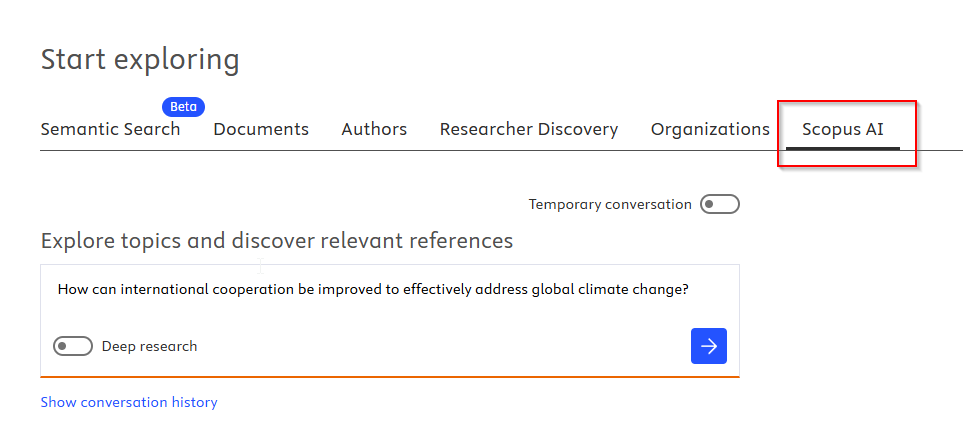
Scopus AI is particularly useful when you want to orient yourself within an academic field and then continue with more precise searching in Scopus. For names, affiliations, publication years and known terminology, use structured or keyword searching rather than relying only on an AI answer.
Sign in to Scopus as per normal and click on the Scopus AI tab.
When You Want to Restrict Your Search to a Specific Set of Journals: Consensus & Scite Assistant
Scopus AI restricts your search to a smaller curated set, but it may still be too broad if you want to run an AI search over a specific set of journals.
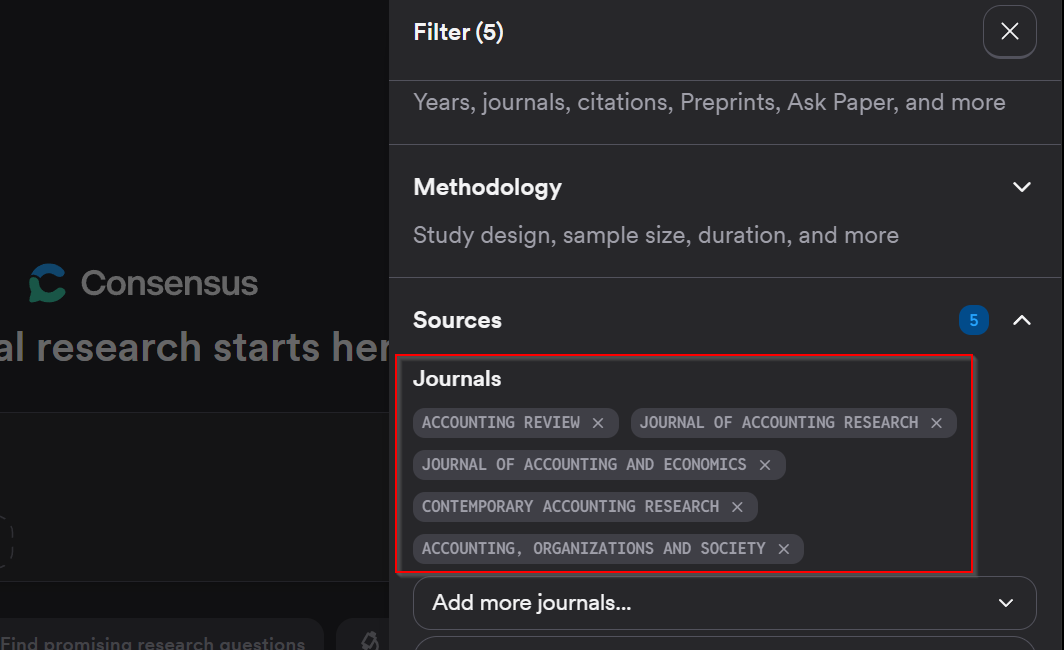
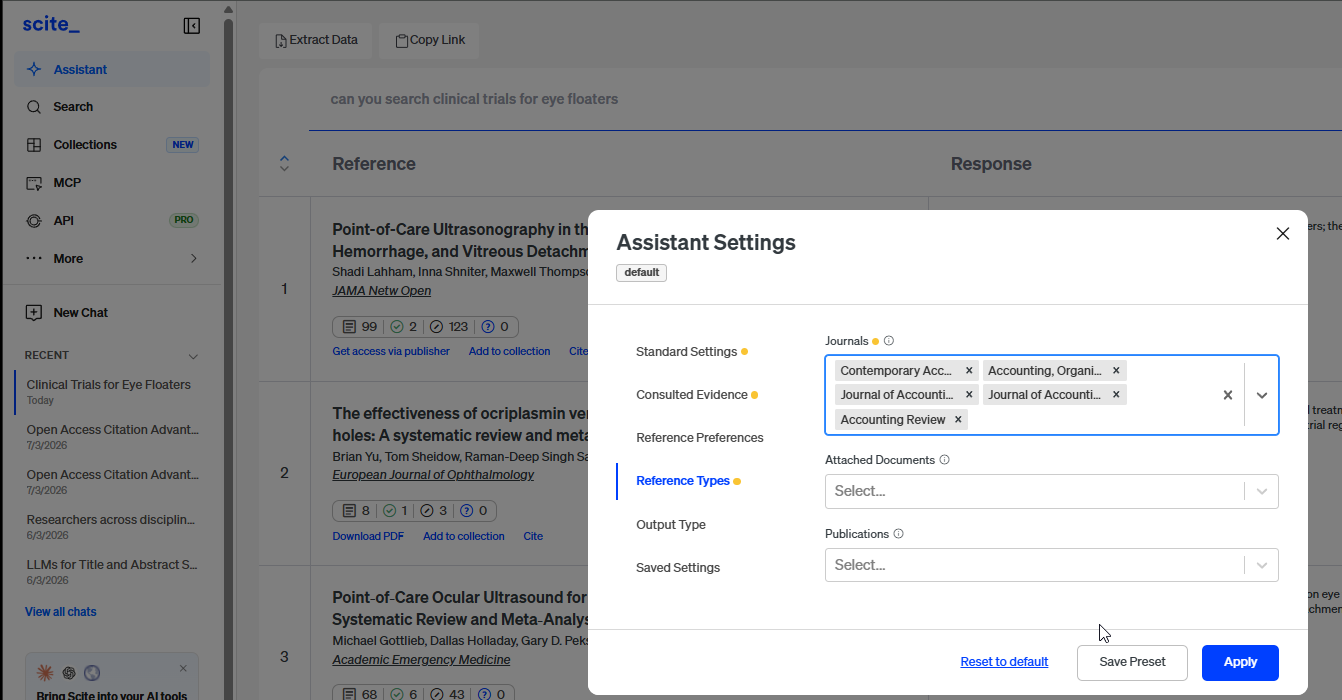
Here you need AI search tools that allow you to filter to specific journals.
In the screenshots below, you can see how to set up filters so that Consensus and Scite Assistant return results only from five accounting journals.
When You Want Broad Academic Discovery for Free: Google Scholar Labs
You have a detailed research question and want help finding papers across the broad Google Scholar corpus. You are more interested in paper discovery than in receiving one polished answer.
Try the free Google Scholar Labs. It breaks a question into different aspects, searches Google Scholar and explains why individual papers may be useful. Updates in 2026 made Labs faster and expanded the number of papers it can scan. Google also introduced Quick Read, which provides a query-focused view of eligible accessible papers, including the answer, approach and important considerations.
This makes Scholar Labs a valuable free option for precise or specialised questions. However, it can be liberal in what it treats as a relevant result. Read its explanations carefully and do not assume that every suggested paper is an equally strong match.
Google Scholar is broad, but it remains centred on scholarly records. It should not be your only tool when the question requires books, news, magazines, policy material or other grey literature.
When You Need to Understand How a Paper Has Been Cited: Scite
You already have an important paper or claim and want to understand the later academic conversation around it. A citation count tells you how often something was cited, but not how it was used.
This is where Scite is useful. Its distinctive feature is its classification of citations by citation context. It can show the surrounding citation statement and indicate whether a later paper appears to provide supporting or contrasting evidence.
These labels still require interpretation. A later paper may challenge one claim without rejecting the whole study, or cite a paper for background rather than evidence. Use Scite to guide citation chasing, then read the citing source directly.
First time user? Register at scite.ai with your smu email.
When You Need to do formal evidence synthesis: Covidence
If you are doing formal evidence synthesis e.g. systematic review, meta-analysis that involves multi-reviewer screening, you should consider the use of Covidence which has been subscribed to SMU.
Among other specific features designed for the evidence synthesis flows, Covidence auto generates PRISMA flow diagrams.
SMU has a institutional license to Covidence, you can sign in directly here or
- Go to Covidence.org
- Click on Sign-in
- Click on Sign-in with SSO
- Enter your SMU email.
A Shared Blind Spot: Books, News, Magazines and Grey Literature
Consensus, Undermind, Scopus AI, Google Scholar Labs and Scite differ greatly in how they work. But they share an important limitation: their index generally contains academic papers, particularly journal articles, conference papers, reviews and preprints.
Many research questions require a wider range of sources, including:
- scholarly monographs and edited books;
- government, policy and regulatory documents;
- reports from NGOs, think tanks and professional bodies;
- industry, market and company reports;
- newspapers and magazines;
- working papers, institutional reports and technical documentation;
- current webpages.
These sources may be absent from an academic index, included inconsistently, or difficult to retrieve through a tool optimised for matching questions to journal articles.
When You Need Books and Other Library Materials: Primo Research Assistant
You are at the beginning of a project and need materials beyond journal articles. You may be looking for monographs, edited books, broader disciplinary background or resources available through SMU Libraries.
Consider using Primo Research Assistant. It accepts natural-language questions, generates an answer based on records available through the Central Discovery Index and links you to supporting records and the wider Primo results.
Primo is particularly valuable in fields where books remain central, including the humanities and many areas of the social sciences. It can also help provide the theoretical, historical or disciplinary context that is often missing from article-centred AI tools. It also covers news, magazines and periodicals, which can be useful for current affairs.
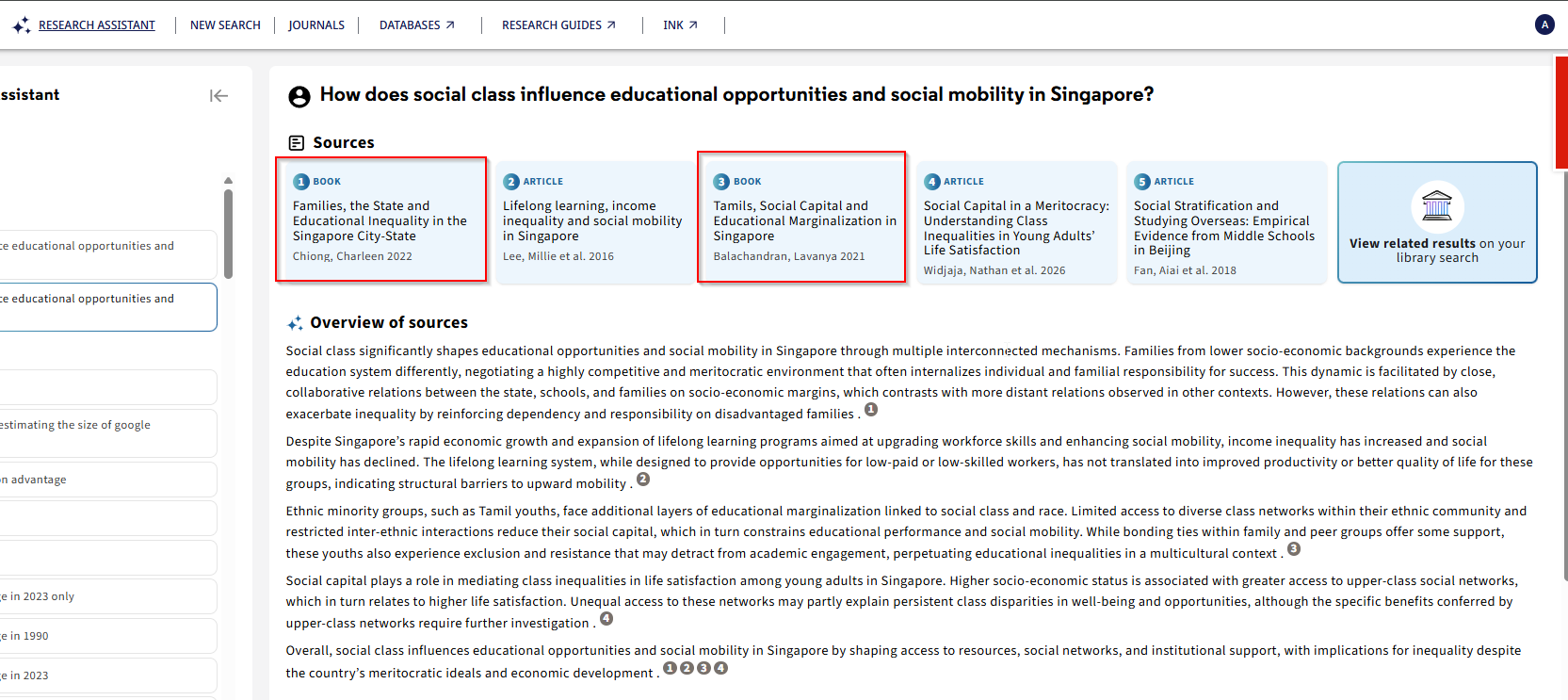
However, Primo Research Assistant does not literally search everything held or licensed by SMU Libraries. Many specialised databases and collections still need to be searched separately. Treat the generated answer as an entry point, then continue into Primo using keywords, filters, subject headings, authors and citations.
Primo Research Assistant also uses and displays only the top five results. Its relatively lightweight ranking system may not always rank results as effectively as Consensus or Undermind.
Primo helps address the book and library-discovery gap. It does not fully solve the grey-literature gap. For government reports, policy papers, news, magazines and current web information, turn to an open-web deep-research tool.
Access Primo Research Assistant here
When You Need Grey Literature (beyond preprints), News and the Wider Web: Deep-Research Agents
Your question goes beyond academic literature. You need a broader evidence landscape that may include government reports, policy papers, professional guidance, industry publications, company reports, news, magazines and current webpages.
This is where open-web deep-research agents can help. Like Undermind and Consensus Deep Search, these tools do not simply run a single search. They can plan a multi-step investigation, conduct several searches and produce a cited report.
The main difference is that they go beyond the academic indexes used by Undermind or Consensus to search the open web. While this can be riskier than searching only academic indexes, some topics require this broader range of sources.
There are many options, but SMU users can consider:
- Gemini Deep Research (SMU students and staff)
- Microsoft 365 Copilot Researcher (SMU staff/faculty)
- ChatGPT Deep Research / Claude Research Mode (if you have a personal subscription)
Warning! While specialised academic RAG tools like Consensus, Undermind.ai have specialized guard-rails that ensure that every paper cited is guaranteed to be real (though the interpretation of the paper might be off), general Deep Research agents that search the web are less robust and may hallucinate more, particularly the older less powerful LLMs. Always check and validate that the paper actually exists and says what is claimed in the paper.
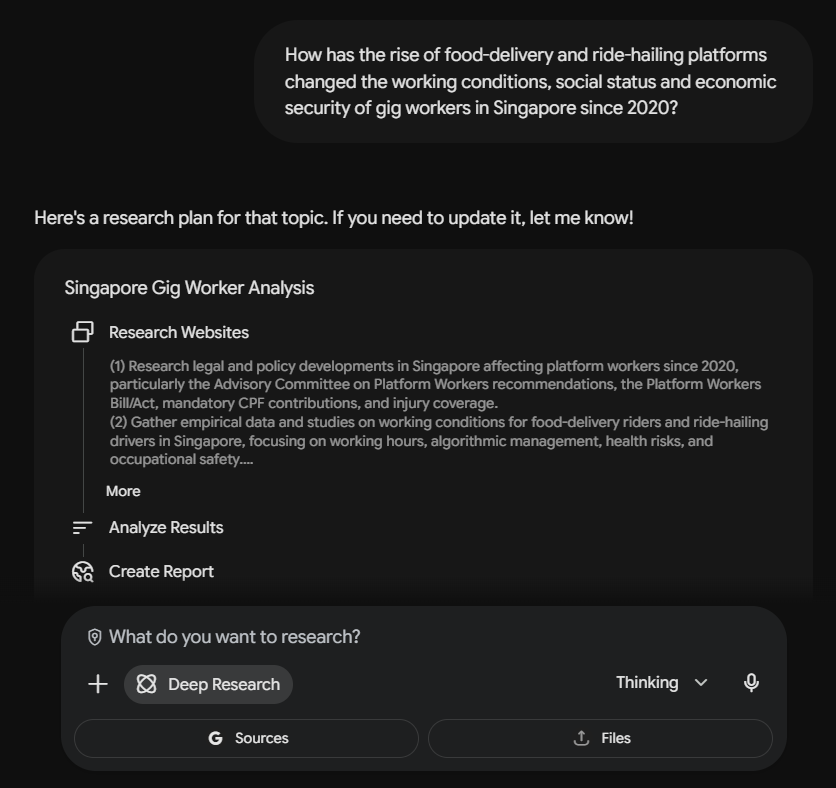
For most SMU students and instructors: Gemini Deep Research
All SMU staff and students have access to Gemini Education Plus.
As such, Gemini Deep Research is a convenient institutionally available option for investigating the wider web. It can develop a research plan, search iteratively and produce a report with citations. Depending on the account and configuration, it may also work with uploaded files or connected Google Workspace sources.
While it can find peer-reviewed academic content, it can also go beyond this and is useful for topics involving policy, government, industry, professional practice, current technology or public information spread across many websites.
For SMU staff only: Microsoft 365 Copilot Researcher
If you are SMU staff, you have an alternative to Gemini Deep Research.
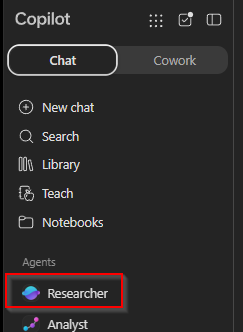
Choose the Microsoft 365 Copilot Researcher agent when the task requires both public-web evidence and relevant material from your Microsoft 365 work environment. Subject to your existing permissions, it can draw on accessible files, emails, meetings and chats on sharepoint etc as well as the web.
This makes it particularly useful for environmental scans, policy comparisons, institutional reports and projects that need to connect external evidence with internal context.
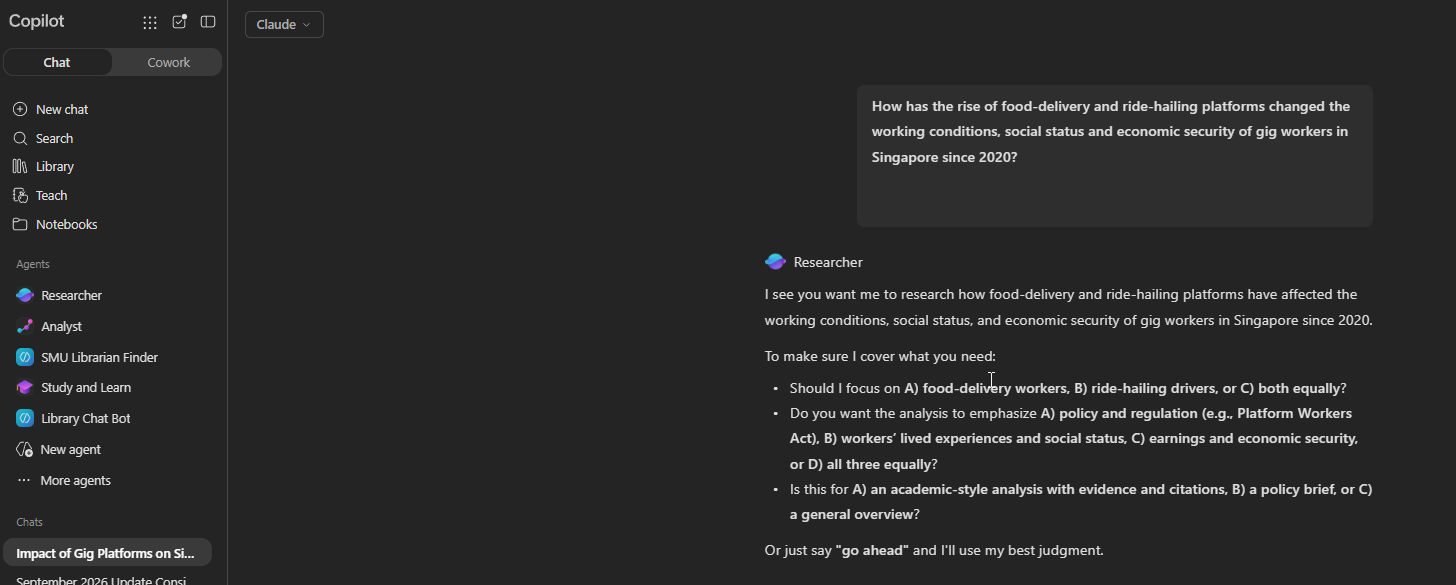
One advantage of the Microsoft 365 Researcher agent is that you can choose between Claude and ChatGPT models.
For Users with Paid ChatGPT or Claude Subscriptions: ChatGPT Deep Research or Claude Research Mode
If you have a personal ChatGPT or Claude subscription, you can also use their deep-research modes.
You can also connect ChatGPT or Claude to academic MCP servers such as Scite, Consensus or Undermind via MCP/connectors. However, when using the deep-research modes of ChatGPT or Claude, my current preference is to rely purely on web search and turn off the academic connectors, because I would already have searched Undermind, Consensus or Scite separately.
The trade-off
Web research agents offer much greater source diversity, but broader does not necessarily mean comprehensive. A long report with many citations can still omit important sources, overrepresent easily discoverable webpages or mix sources of very different authority.
Specify the source types, jurisdictions and date ranges that matter. Ask the tool to prioritise authoritative organisations, or even specify particular sites to search. Then inspect the important citations and consider searching key government, organisational and repository websites directly.
Remember that whether you are using Gemini Deep Research, Microsoft 365 Copilot Researcher or ChatGPT Deep Research, by default you are using AI to search the open web, with all the risks and rewards that implies. These web-search tools may also be more likely to hallucinate sources than academic AI search tools, so check their citations carefully.
Why You Should Not Rely on One Tool
No individual tool is perfect. Often, it makes sense to combine multiple tools.
For an important project, a better workflow is to combine tools:
- Use Consensus, Undermind, Scopus AI or Google Scholar Labs for academic papers.
- Use Primo Research Assistant and conventional Primo search for books and library materials.
- Use Microsoft 365 Copilot Researcher, Gemini Deep Research, ChatGPT Deep Research or Claude Research for grey literature and current web sources.
- For recent topics, or those requiring sources beyond what can be found in academic indexes, my usual approach is to pick one of Undermind, Consensus, Scopus AI or Google Scholar Labs for academic literature and complement it with something like ChatGPT Deep Research for open-web sources.
Conclusion
The biggest mistake in AI search is to look for a single tool that does everything. There isn't one.
Academic AI search engines can be excellent at finding and synthesising papers, but a strong search of journal literature is not necessarily a comprehensive search of the evidence landscape. Books may matter. So may government reports, policy documents, industry material, news and current webpages. Conventional databases may still matter when systematic coverage is important.
So instead of asking "Which AI search tool is best?", ask three questions:
What research job am I trying to perform? What types of sources do I need? What might this tool systematically miss?
Those questions will often lead you to combine tools rather than choose one. AI can make discovery and synthesis much faster, but deciding what counts as relevant evidence, where to look for it and whether the sources actually support your needs.
For many SMU users, a sensible combination is Consensus Pro for general academic questions, Undermind for difficult academic-paper retrieval, Scopus AI or Google Scholar Labs for alternative academic discovery, Primo Research Assistant for books and library materials, and Gemini Deep Research or Microsoft 365 Copilot Researcher for grey literature and current web evidence.
AI tools can accelerate discovery and synthesis. They do not remove your responsibility to select the right evidence landscape, inspect the original sources and recognise what each system leaves out.